Put any web page on your Home Screen.
Pick a site, crop to the part you actually care about, and the widget keeps a fresh snapshot of it. A price, a scoreboard, a headline, a launch countdown, a dashboard you check ten times a day.
The part of the web you check, right on your Home Screen.
This is why most people install One Big Widget. Choose any site, crop to what matters, and get a snapshot kept fresh in the background and refreshed every time you open the app.
- Any sitePrices, scoreboards, headlines, RSS feeds
- Crop itShow only the part you care about
- Stays freshBackground updates, plus a refresh on every app open

One smart widget. Only the thing that counts.
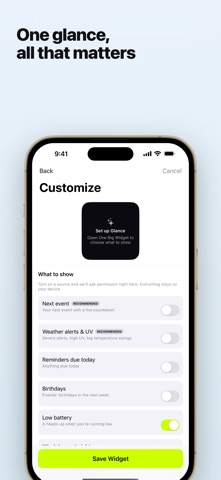
Your next event, reminders due today, a severe weather alert, an upcoming birthday, or a low battery warning, ranked by urgency so you only see what matters right now. Everything is gathered on your device.
- Ranked by urgencyThe most important item rises to the top
- On-deviceCalendar, reminders & contacts never leave your phone

Three taps to something beautiful.
Pick a template, tap a few colors, and drop it on your Home Screen, with a deeper editor underneath when you want to control every detail.
- Photos & GIFsPhoto widgets in every size, animated GIFs from your library
- CountdownsUpdate to the day, hour, and minute
- ClocksDigital and analog
- Text & gradientsCustom text, bundled quotes, multi-color blends
Home Screen to Lock Screen.
All from the same builder, with no upsell to unlock the size you actually need.
Small to extra large
Small, medium, large, and extra large Home Screen widgets.
Lock Screen
Circular, rectangular, and inline Lock Screen widgets.
Private by design
No accounts, no tracking, no analytics, no third-party SDKs.
A free tier that's actually free.
Want everything? A one-time purchase unlocks all 127 designs, including the Web Widget and At a Glance, plus every future addition. Pay once, yours forever. A yearly option is available too, and unlocks exactly the same features.
- Unlimited widgets, no count cap
- Every widget size
- 82 of the 127 designs
- Custom colors
- No ads in the editor, ever
Questions, answered.
Is it really free?
Yes. The free tier includes unlimited widgets, every widget size, 82 of the 127 designs, and custom colors, with no ads in the editor.
What does the unlock include?
All 127 designs, including the Web Widget and At a Glance, plus every future addition. It's a one-time purchase. Pay once, yours forever.
How fresh is the Web Widget?
The widget keeps a snapshot of the part of the page you cropped, kept fresh in the background and refreshed every time you open the app.
What happens to my data?
No accounts, no tracking, no analytics, no third-party SDKs. Your photos, calendar, reminders, and contacts never leave your device. The only thing that ever leaves is feedback you choose to send from Settings.
What is One Big Widget, who is it for, and what does it run on?
One Big Widget is a widget builder that can also put any web page on your Home Screen. It is for anyone who wants a custom widget or a fresh snapshot of a page they check often, and it runs on iPhone and iPad. To make a Web Widget, pick a site and crop to the part you care about.
Put any web page on your iPhone Home Screen · Why an iOS widget cannot show a live web page
One widget. Whatever you need.
Put any web page, photo, countdown, or clock on your Home Screen. Free to download.